Heavy truck repair shop software for fleets
A truck shop doesn’t track a Civic: it tracks units, engine hours and customers who pay with a purchase order. GaroPro is built for that, in New Brunswick, Quebec and across Canada.
14-day trial · Web and mobile · English and French
Every truck, by its unit number
Turn on heavy vehicles in the shop settings: the vehicle file carries its category, unit number and engine hours. At check-in, the work order records engine hours on arrival, next to mileage.
An inspection built for heavy vehicles
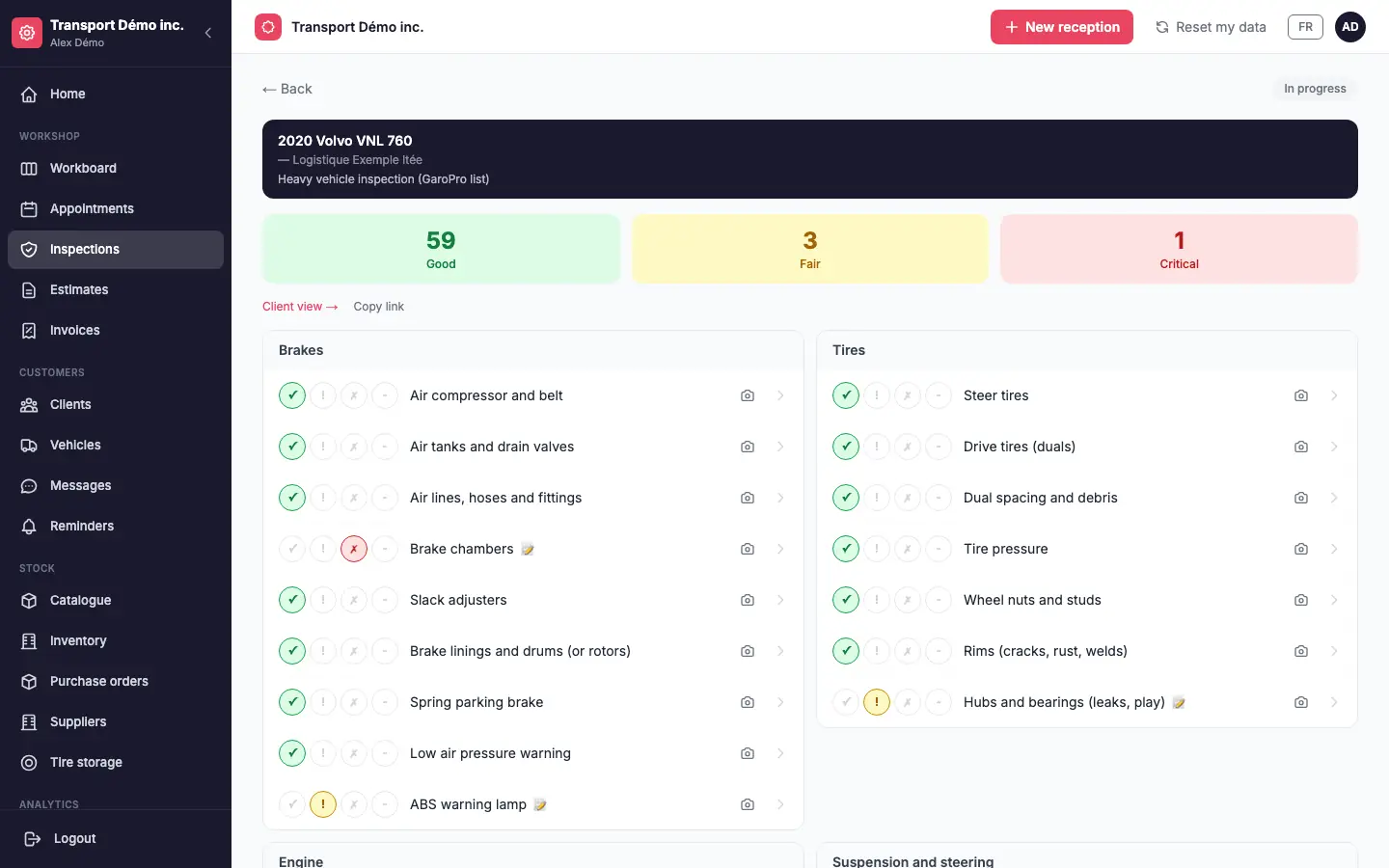
GaroPro offers three inspection templates: light vehicle (43 points), heavy vehicle (63 points) and trailer (32 points). The technician fills it out on their phone, with photos, and the customer gets a clear summary of what’s urgent and what can wait.
These inspections describe the vehicle’s condition for your customer; they don’t replace any inspection required by regulation.
A fleet view for each customer
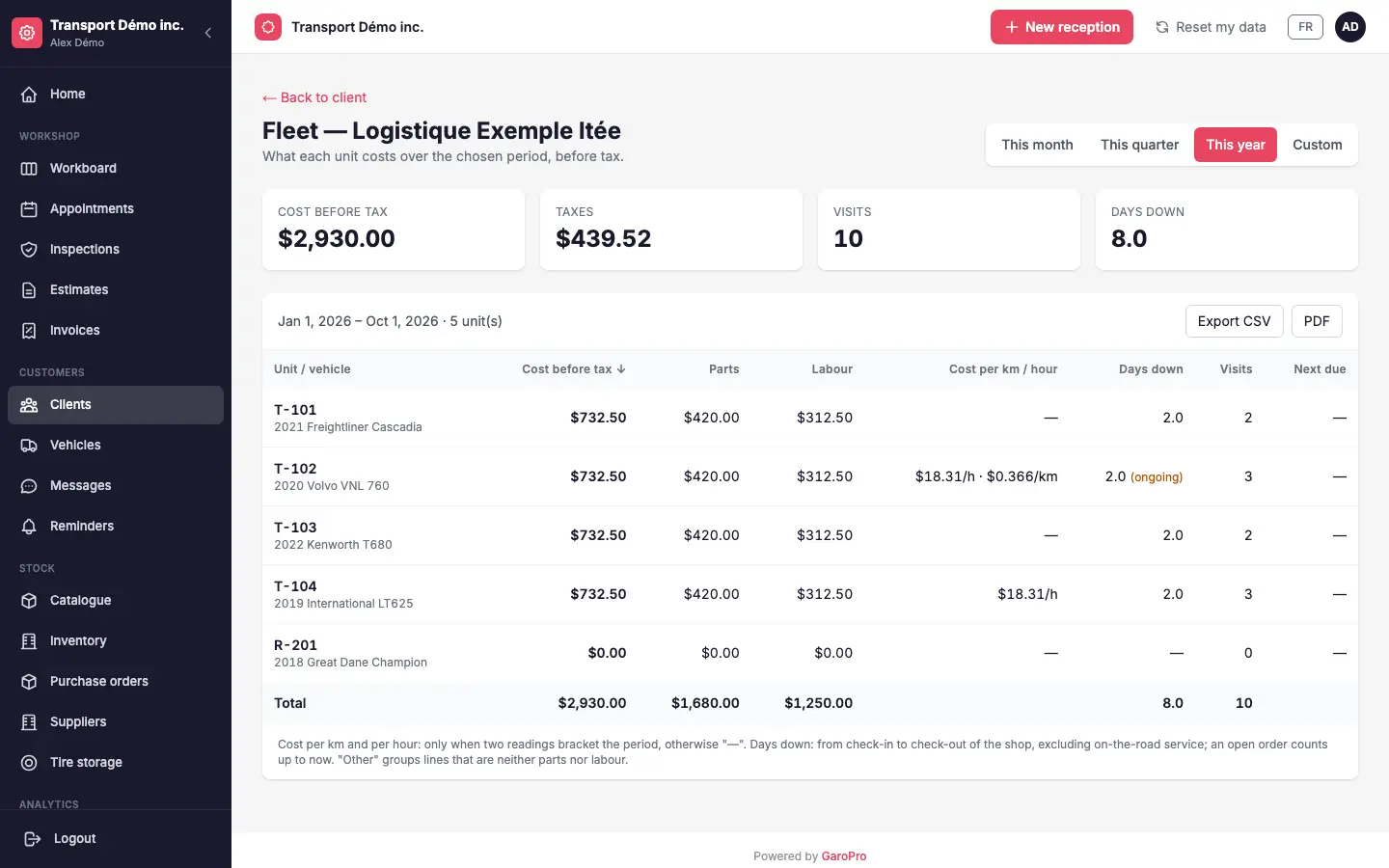
For a customer with several units, the fleet view brings together, per vehicle and over the period you choose:
- repair cost, split between parts and labour
- cost per kilometre or per engine hour, when two readings allow it
- days off the road and number of visits
- a CSV or PDF export to hand to the fleet manager
The monthly report, sent to the customer
Turn it on in the customer’s file: each month, their fleet manager receives the report for the month just ended, as a PDF, by email. The fleet view and monthly report are included in the Pro plan.
Purchase orders for business customers
The purchase order (PO) number follows the work order to the invoice. Check “PO required” on a customer’s file: their invoice doesn’t go out without it.
A vehicle you don’t know yet
A truck shows up and you don’t have its VIN? Open the work order with a vehicle to identify, and complete its file on site.
Work orders waiting for parts, and your suppliers
Flag that a work order is waiting for parts, with the supplier and the reason: the shop sees how long the unit has been waiting, and the Pro plan adds the waiting-hours report. Your suppliers have their own records, reused on purchase orders; records are managed on the web, and the supplier can also be picked in the app.
Frequently asked questions
Can we track trucks by unit number?
Yes. With heavy vehicles turned on, each file carries a unit number, the vehicle category and its engine hours.
Which inspections for a tractor and a trailer?
The heavy template has 63 points and the trailer template 32 points. The light template (43 points) remains available for other vehicles.
Does the fleet report go to the customer automatically?
Yes, once turned on in the customer’s file: they receive the previous month’s report each month, as a PDF, by email.
Can we require a purchase order?
Yes. Check “PO required” on the customer’s file: an invoice without a PO number doesn’t go out.
Does it work for a small fleet?
Yes. The fleet view works as soon as a customer has more than one vehicle, even two or three.
Which plan?
Heavy vehicles, inspections and PO required are on every plan. The fleet view and monthly report are on the Pro plan.