Auto repair invoicing software in Canada
From approved estimate to paid invoice without retyping anything: your province’s taxes, your tax numbers, an invoice in your customer’s language and online payment.
14-day trial · Web and mobile · English and French
Your province’s taxes, calculated for you
GaroPro applies the tax system of your shop’s province. You don’t set up percentages and you don’t redo the math by hand.
Each invoice keeps the tax rate and tax name of the day it was calculated: if a rate changes later, an invoice already sent stays the one your customer received.
- HST in New Brunswick, Nova Scotia, Newfoundland and Labrador, Prince Edward Island and Ontario
- GST and QST in Quebec
- GST and PST in Manitoba, Saskatchewan and British Columbia
- GST in Alberta and the territories
Your tax numbers and your brand on every invoice
Your GST/HST number and your QST number print on the invoice, with your logo and contact details. Choose from six invoice templates and set your own numbering.
An invoice in your customer’s language
The PDF goes out in English or French, based on the language on the customer’s file. One shop serves English- and French-speaking customers without switching software.
Paid online or at the counter
Send a payment link by email or text: the customer pays by card, through Stripe or Square depending on the account you connected. You can also give Interac e-Transfer instructions.
At the counter, mark the invoice paid in one click. Online payment is included in every plan.
Overdue invoices don’t slip through
GaroPro alerts you to invoices past their due date. If you turn it on, the customer also gets an email reminder with the invoice attached.
Purchase orders for your business customers
The customer’s purchase order (PO) number follows the work order to the invoice. For a customer who requires one, check “PO required” on their file: their invoice doesn’t go out without it.
Your bookkeeping, without retyping
Export your invoices to QuickBooks on every plan. The Pro plan adds the Sage 50 export and a report of the taxes collected over the period you choose, ready for your filing.
From estimate to invoice
The customer approves the estimate online in one click. The approved estimate becomes a work order, then an invoice: parts, labour and prices carry over, nothing is retyped.
Service packages
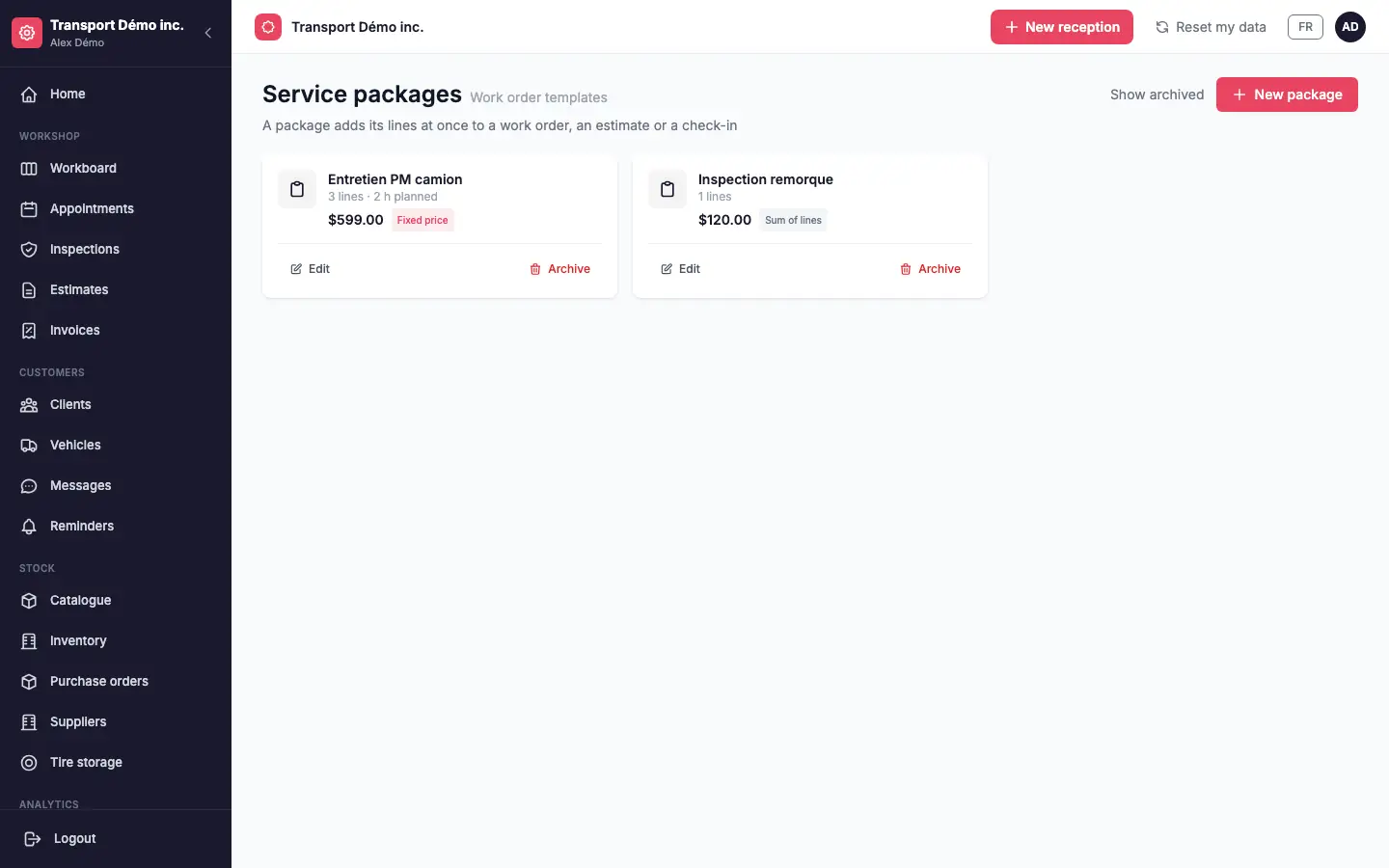
A package adds its lines in one go to a work order, an estimate or a check-in: an oil change, a tire install, a unit’s maintenance. At a fixed price, the customer sees the package price; as the sum of its lines, they see the detail. Included in every plan.
Each customer’s negotiated hourly rate
A fleet customer has a negotiated rate? Enter it on their file: labour on their estimates, work orders and “sum of lines” packages takes that rate automatically, and a price typed by hand stays the one you chose. Changing the rate never changes a document already created. Every plan.
The monthly account statement
For customers who pay by statement: balance brought forward, the month’s invoices with unit and purchase order, payments received, balance due and overdue invoices, as a PDF in the customer’s language, with the payment link of each invoice due. Sent by hand from the customer’s file on every plan; with the Pro plan, the statement is prepared on the 1st of the month and sent in one click after review: nothing goes out without you.
IA GaroPro
From findings to estimate, in one click
After an inspection, GaroPro AI turns urgent and watch items into an estimate ready to review: lines in English and French, your catalogue prices, your labour rate or the customer’s negotiated rate, taxes calculated. You review, you send.
Every Monday, administrators receive a weekly summary by email: revenue collected, work orders completed, estimates awaiting an answer and upcoming reminders. The AI assists, you decide. Pro plan, trial included.
Discover GaroPro AI →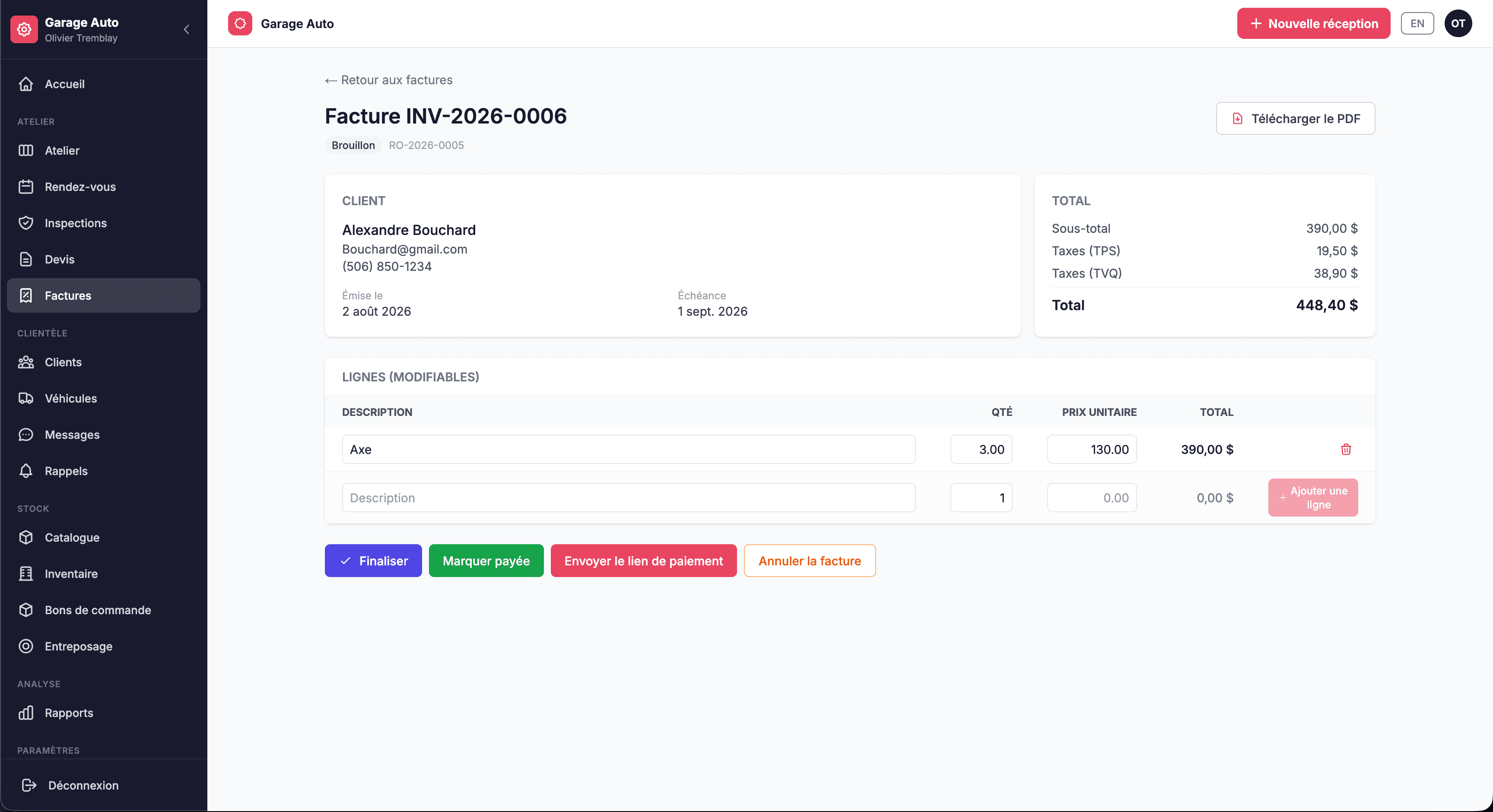
Frequently asked questions
Does GaroPro calculate QST?
Yes. A Quebec shop charges GST and QST, each on its own line. Other provinces have their own system: HST, GST and PST, or GST only.
Can I show my GST/HST number on the invoice?
Yes. Your GST/HST and QST numbers print on every invoice once they are entered in the shop settings.
Do my French-speaking customers get their invoice in French?
Yes. The invoice follows the language on the customer’s file: English or French.
How does my customer pay online?
You send a payment link by email or text. They pay by card, through Stripe or Square depending on your account. You can also give Interac e-Transfer instructions.
Can I export my invoices to QuickBooks or Sage 50?
QuickBooks export is included in every plan. Sage 50 export is included in the Pro plan.
What happens when an invoice isn’t paid on time?
GaroPro alerts you once the due date has passed. If you turn it on, the customer gets an email reminder with the invoice.